The LDA won’t show up in Add/Remove programs, it is a small DLL that beings up a branded popup by the clock asking you to download the Logitech control software.
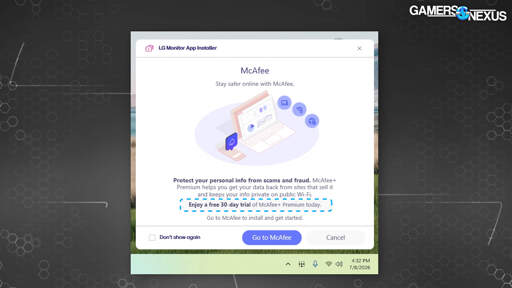
The LDA popup looks like this currently:
If you google Logitech Download Assistant you will find a lot of posts about it and asking how to uninstall it.
To check if you have it on your computer, you can open the Task Manager, go into the Startup tab, and check the list there.
You can also check the System32 folder and look for a file called LogiLDA.dll
I have confirmed that neither startup, nor System folders on the old Win11 install have LDA. Very strange how I was spared, despite using the G203 and K120 to type this post.

The LDA won’t show up in Add/Remove programs, it is a small DLL that beings up a branded popup by the clock asking you to download the Logitech control software.
The LDA popup looks like this currently:
If you google Logitech Download Assistant you will find a lot of posts about it and asking how to uninstall it.
To check if you have it on your computer, you can open the Task Manager, go into the Startup tab, and check the list there.
You can also check the System32 folder and look for a file called LogiLDA.dll
Very informative! Thank you!
I have confirmed that neither startup, nor System folders on the old Win11 install have LDA. Very strange how I was spared, despite using the G203 and K120 to type this post.
You might have had a GPO configured to stop this.