- cross-posted to:
- selfhosted@lemmy.world
- selfhosted@lemmy.world
- cross-posted to:
- selfhosted@lemmy.world
- selfhosted@lemmy.world

Me again :P
Honey, I Shrunk The Vids is a streamlined video conversion tool built on FFMPEG, with smarts built in for standardising all files put through it to a standard target bitrate into either .mp4 or .mkv containers, in either h.264 or HEVC format. Comes in GUI for desktop and CLI for headless operation. The idea is that you can point it at a folder full of folders full of videos and hit “Start”, and trust that when it’s through you’ll have videos compatible with devices back to ~2014, smaller (or at least no bigger) than they were before, and with accurate MKV tags where appropriate.
The application has gone through some more major revisions since my last post, and I thought people would like to know! The first thing you’ll notice is the visual refresh:
Screenshots
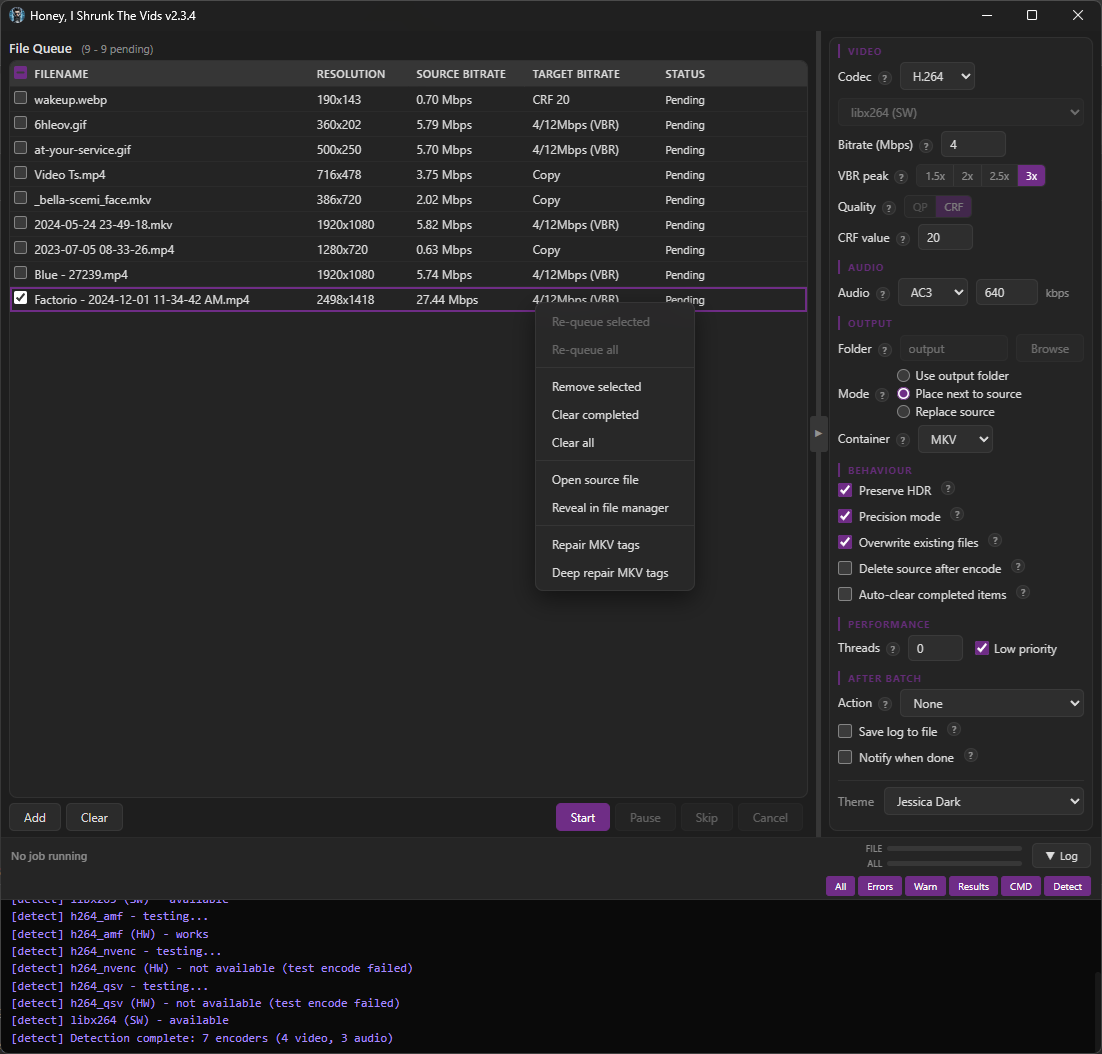
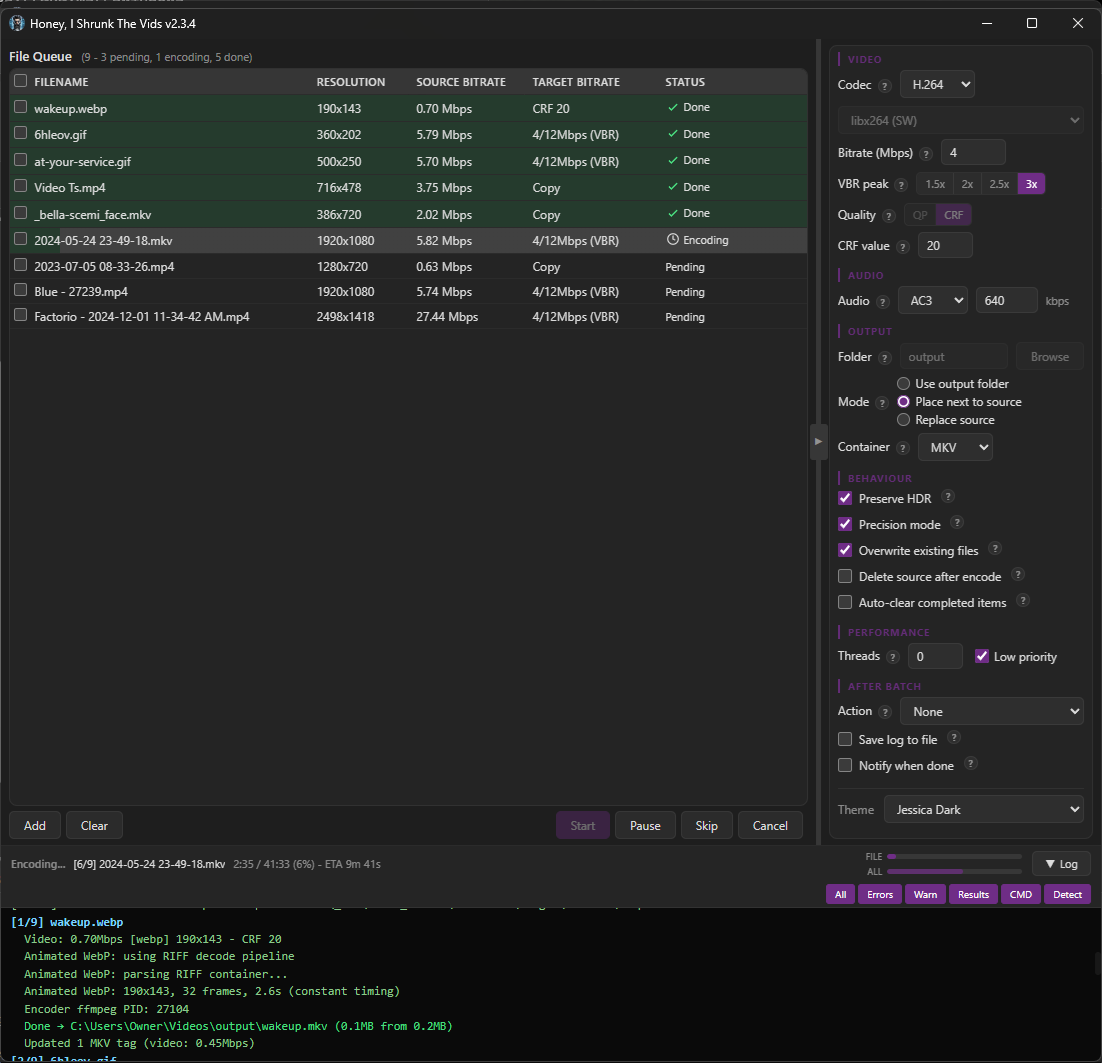
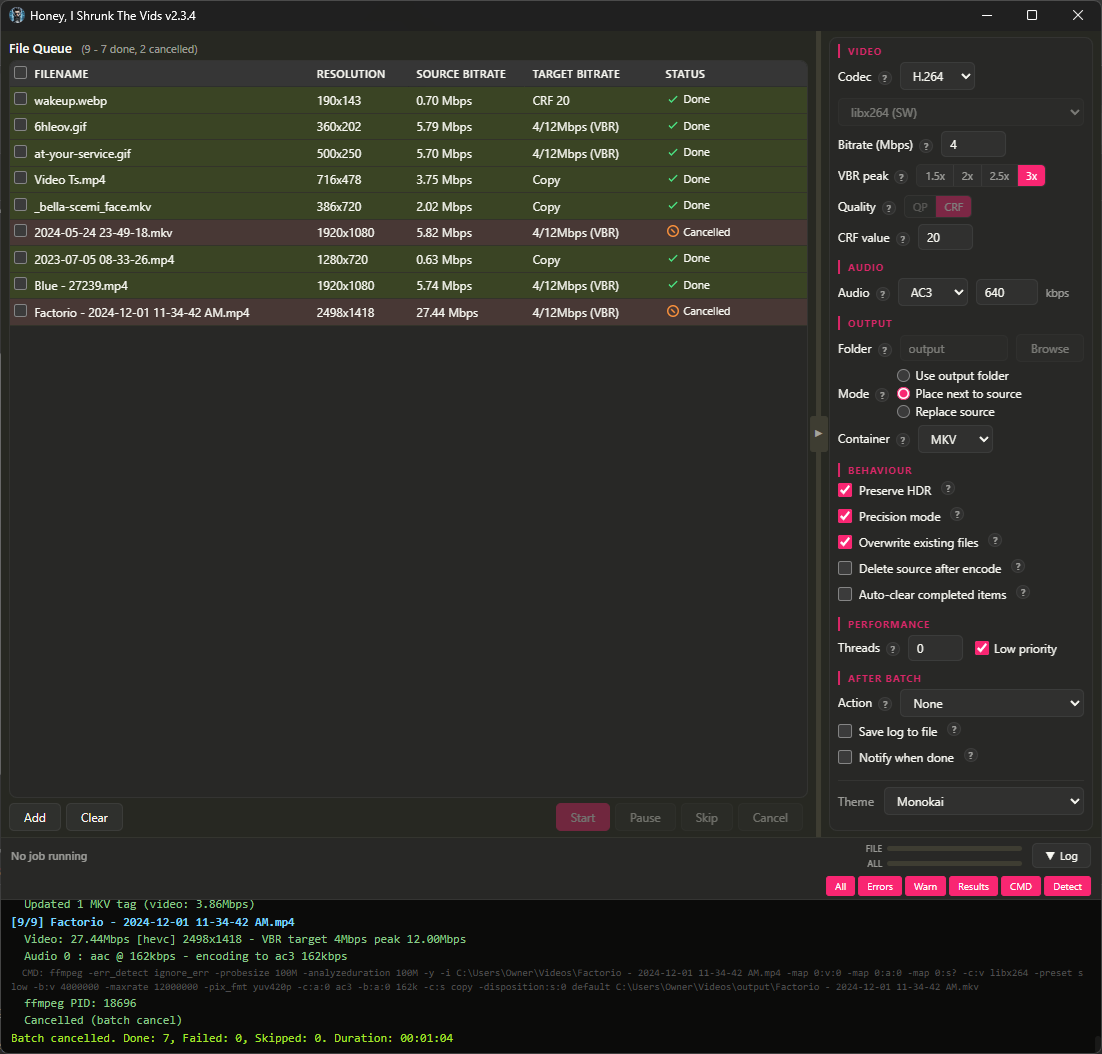
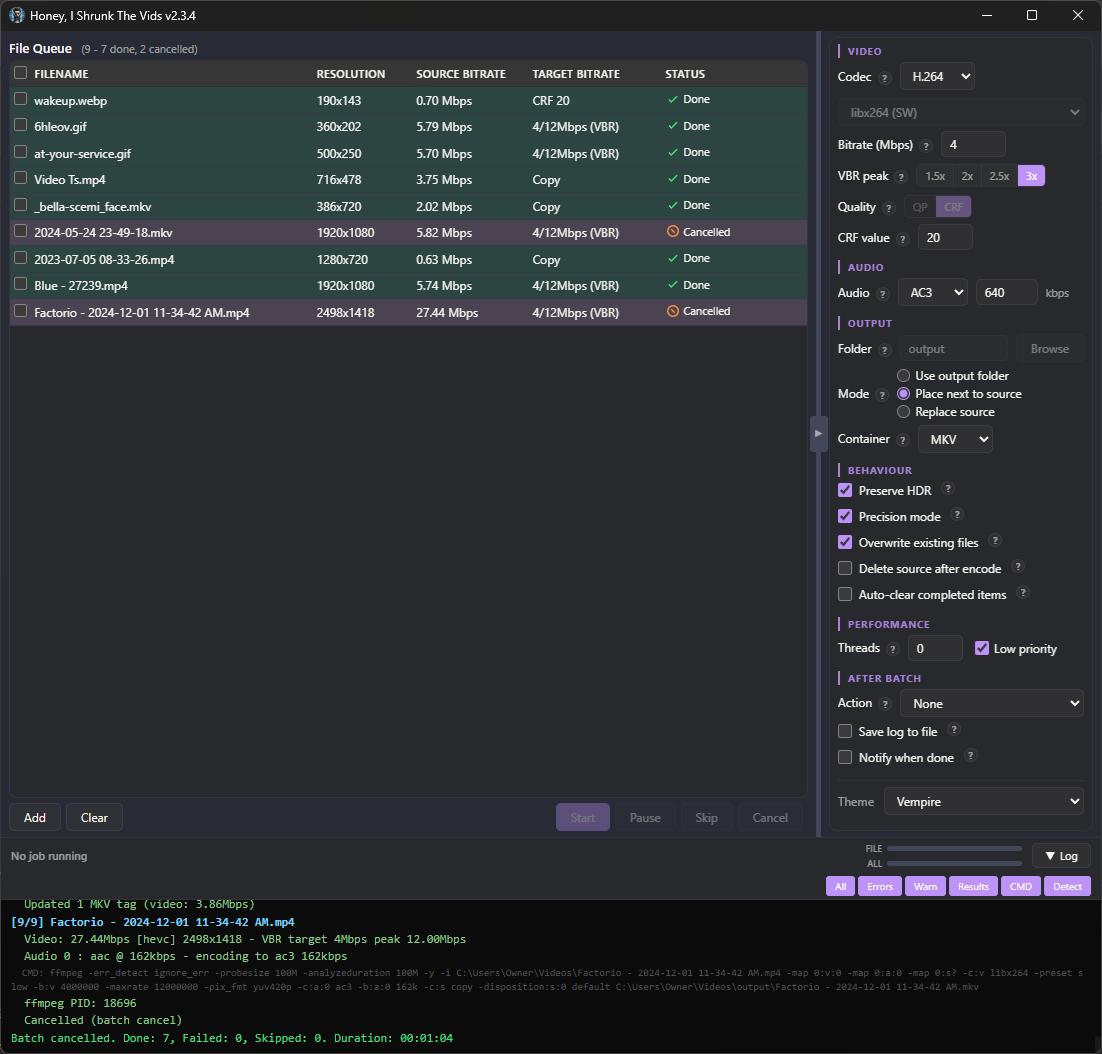
There are no more menu tabs; all options are exposed in a single side panel. Also, I added exotic filetypes for inputs: mts, mpg, mpeg, vob, flv, 3gp, 3g2, ogv, rmvb, rm, asf, f4v, y4m, apng, webp. That’s right, you can convert basically anything FFMPEG supports to convert to MKV or MP4!
I’m particularly proud of the webp support. FFMPEG can’t decode animated WebP natively (or at least, the most popular binaries can’t; maybe someone has a fork that’s fixed it), so HISTV:
- Parses the RIFF container itself,
- Decodes each frame through ffmpeg’s static WebP decoder,
- Composites them with correct alpha blending and disposal, and
- Pipes the result to the encoder.
Temp files are completely avoided for storage/IO reasons; variable frame timing is preserved, so smooth per-frame progress is retained from source.
The one filetype I left out was .yuv, because that’s raw data, no container or headers, and the user would have to enter the correct dimensions for each video (which defeats the core purpose of Honey, I Shrunk The Vids, so it’s out of scope for this project).
The theme engine has been simplified, with only 6 keys down from 16, and everything named more intuitively so it’s easier to tell what changes what. As well, a Linux user reported their FFMPEG wasn’t discovered properly, so ffmpeg discovery now uses login-shell PATH resolution (previously macOS only), fixing detection when ffmpeg is installed to locations like ~/.local/bin.
Bunch of bugs got squished (for example the encoder would switch when toggling the new “Precision Mode” checkbox), and several more efficiency passes were made with more hand-edits than ever. This is the cleanest, leanest build yet, and the most featureful.
Finally, I added “-full” versions for each platform. These come bundled with FFMPEG, if you want just a single download.
Also, I’ve flirted with the idea of signing the Windows executable so Windows Defender stops complaining about it, but I don’t yet see a reason to give Microsoft money for that. You can just click “More Info”, and then “Run Anyway”.
I’m running out of ideas for future updates, but if anyone has requests just drop a comment or open up an issue! And, as always, I’m here for questions. I hope you find it useful!
You must log in or # to comment.
- Love the project name.
- This looks close to what I’ve imagined coalescing my hand conjured ffmpeg scripts into.
- I’d like to feed this into a pipeline that includes Subler or equivalent.
-
Thank you! I am obnoxiously proud of myself for that one 😅
-
That’s actually how this all started for me haha! I was sitting there tweaking the same command as I hit videos with different formats or quality levels, and I thought to myself that it’d be a lot easier with just a few smarts like detecting if a video is already at the target quality level. The first version was actually just a winforms GUI wrapping that very PowerShell command - it’s come a long way in just a few weeks.
-
Subler is interesting! Hmm. Currently HISTV just copies over ask the subtitle tracks directly. I think I could add a subtitle function like Subler’s to bake in subtitle tracks, if the user has the subtitle file they want to use. Would that be useful? Metadata download from the internet is messy though, I might want to leave that to the existing *arr solutions.
I use Subler mostly as a metadata acquisition and injector tool, and secondarily as a M4V remux sanitiser. The subtitles function is more a subset of its stream management, and is much less relevant than its name implies. That said, it does do a very competent job at converting, through OCR, DVD and BluRay bitmap subtitles to ASCII variants required for MP4 containers.
I think it only works in macOS, which makes it difficult to understand its purpose when you don’t have that platform readily available. Ideally it would have a CLI/TUI which would lend it better to script integration.
Yeah, it’s early and I was just skimming the docs for it as I don’t have a Mac. I’ll think about the metadata downloader; it does have a place, arguably, as related to the mkv tag repair I built in.
As to the CLI, HISTV does have one! It’s a standalone binary but it uses the same Rust backend as the GUI for feature parity and maintainability 😊
-
Nice job and congrats on the webp parser. You made Converseen but for videos :)
Windows cert -> you can also give your money to other companies, the cert doesn’t need to be from MS. But who cares, ask Windows users to buy it for you if they choose to continue using that OS.
Thank you very much, that’s very kind! 😊
I didn’t know I could get the cert from elsewhere, I appreciate the heads up; my experience lies mainly in networking, rather than software. I’ll open that possibility back up, then. It’d be a first for me, and I’m getting a real taste for firsts with this project!
I’m not taking anyone’s money, though, even Windows users (right now, that includes me… I’m working on it lol). I’m doing this purely for the love of the game!
Since you’re still a Windows user at least for now, and assuming that you’re planning on continuing to be open-source, I can recommend Certum for this. https://shop.certum.eu/open-source-code-signing.html
I gave up trying to initialize the USB thingy using Linux (I tried regular Arch [btw] and an Ubuntu distrobox IIRC), but once I got through the initial steps using Windows, I was able to sign ongoing builds with Linux just fine. It took a LOT of trial and error since there seem to be very few people who simultaneously
- pathologically dislike using Windows regularly
- still want to make it easier for people on Windows to minimize Windows Defender complaints when running software that they build
- have the motivation and resolve to send a lot of PII to one of a handful of companies whose longtime business model is based around reputation and trust in order to get a usable certificate
- are stubborn enough to go out of their way to still figure out how to do a subset of this stuff on Linux
- are capable of actually succeeding at that, and
- are willing to show how they did it in a way that should be reasonably easy enough to understand and adapt to your situation
I didn’t renew after my first year - I switched from publishing an executable to publishing it on the web, so I no longer had a need for it - so I don’t know how things have changed (if at all). Most of my information came from eventually stumbling upon this wiki page for a Ruby-based tool where they figured out the last bits I needed to get it to work.
- It also has instructions for initializing the USB thingy on Linux too, so if I were to renew, I’d give that a fair shot… but seeing “icedtea” and a link to a web application that no longer resolves, I’d still only recommend it if you can use a Windows machine once a year.
This is super helpful (and I see that “btw”, you got a smile with that one (☞゚ヮ゚)☞). Thank you for the heads up and all this detailed information! I’m excited to check out Certum.
there seem to be very few people who simultaneously - pathologically dislike using Windows regularly - still want to make it easier for people on Windows to minimize Windows Defender complaints when running software that they build
Describes me to a T 😅 My career is rooted in support, so my pathologies include trying to make things end-user easy.
I envy you so much, I used to love programming. Enjoy the process and the firsts!
Good luck with your eventual transition to Linux! Check in with Lemmy communities if you want help with anything!
Hello!
If you want a bigger challenge, try solving the Dolby Vision vs HDR10+ fight between Samsung and LG/Sony.
I haven’t seen anyone with a fully compatible solution yet. Im in the process of building some Tdarr plug-ins based off of this repo
https://github.com/nichols89ben/Tdarr_DoVi_ProcessingThe goal is to take source content that contains either DoVi profile 4,5,7,8 or HDR10+ and output a mp4 or mkv that contains the base HDR10 layer along with BOTH HDR10+ and DoVi 8 additional streams, and then test on various players to see if they can utilize those streams correctly for the ones they support.
This topic goes quite deep so be prepared to get sucked in. Your existing tickbox for “preserve HDR” probably doesn’t work at all for DoVi profile 5.
Hahaha baby steps! But I’ll look at it; if nothing else I think it would be very funny to have the dev equivalent of Jar Jar Binks end the format war by accident (which I say as just a joke; I of course have no idea how complex the issue actually is).
Edit: Damn dude, you weren’t kidding about the challenge. You’re right that HISTV won’t work for DoVi 5 in its current state - “Fundamental to FFMPEG” does kinda mean “fundamental to HISTV”, being that it’s basically just a clever wrapper around FFMPEG. That said, if your tooling is ready, I’ve got a plan to integrate it. The philosophy with HISTV is to preserve whatever we can and fall back gracefully as far as we have to if we can’t preserve the current profile, which your tools slot into like they were made for it (Rust Gang represent (👉゚ヮ゚)👉).
Hey, I haven’t made a full post about this yet, but I thought you’d like to know: v2.5.0 is out, and it implements quietvoid’s tools for DoVi support! https://github.com/obelisk-complex/histv-universal/releases
It’ll even handle DV 5 and 7 😊
One thing I’d like to see from an app like this is “force the video into an arbitrary file size limit” with a list of priorities to do so defined by the user. Say I’ve got a video I want to send over Discord (10mb limit) but I’m not intending for the vid to be fullscreened by the recipient so scaling it down to like 480x480 would be fine.
You know what? I think I can figure out a way to estimate final file size and display it to the user. It’ll only work if “Precision Mode” is off though - that uses “CRF” or “Constant Rate Factor” which basically tells the encoder “be efficient, but make the file as big as it needs to be to look good”. As a result there’s no way to tell how big the file will end up being - the encoder makes the decision on the fly.
With “Precision Mode” off, HISTV has two gears:
- If your file is already small enough (at or below the target bitrate), it uses “CQP” or “Constant Quantisation Parameter” (the QP I/P numbers), which tells the encoder “Use this quality level for every frame, I don’t care how big the file ends up”. It’s fast and consistent - every frame gets the same treatment.
- If your file is too big, it switches to VBR (Variable Bit Rate), which tells the encoder “Stay around this target bitrate, spike up to the peak ceiling on complex scenes, but don’t go over”. It’s how the app actually shrinks files. You can estimate the output size with target mbps * seconds / 8 - so a 60-second clip at 4Mbps lands around 30MB. <- This is the maths I’m thinking about doing to display the estimate to the user.
As an inspiration for this, look into Two-Pass encoding
Fun fact - HISTV actually has two-pass encoding! Though, with enough system RAM you can actually look ahead far enough that you can get the benefits of two-pass in just a single pass. I have a bit about this in the README.md:
Precision mode
One checkbox for the best quality the app can produce. It picks the smartest encoding strategy based on how much RAM your system has:
Your RAM What it does 16GB or more Looks 250 frames ahead to plan bitrate (single pass) 8-16GB Looks 120 frames ahead to plan bitrate (single pass) Under 8GB Scans the whole file first, then encodes (two passes) Two-pass only happens when precision mode is on AND the system has less than 8GB RAM AND the file would be CRF-encoded. Reason being those lookaheads above. Lookahead buffers live in memory. On low-RAM systems that buffer would be too large, so the app falls back to two-pass instead and stores the analysis run in a tempfile on disk. To break down each one:
- Pass 1: Runs ffmpeg with -pass 1 writing to a null output. ffmpeg analyses the entire file and writes a statistics log (the passlog file) describing the complexity of every scene. No actual video is produced - this pass is pure analysis.
- Pass 2: Runs ffmpeg with -pass 2 using the statistics from pass 1. The encoder now knows what’s coming and can distribute bits intelligently across the whole file - spending more on complex scenes, less on simple ones - without needing a large lookahead buffer in RAM. After both passes complete, the passlog temp files are cleaned up.
The biggest problem with two-pass encoding is the speed. It has to do two passes over the whole file: one analysis, one actually encoding. With a 250-frame lookahead, you’re basically just writing your passlog into RAM - and reading from it - as you go. With 120-frame lookahead your CPU will likely catch up to the passlog at times, but you can still write to and read from it as you go, so you still get similar speed, and still close enough in quality that it doesn’t really make a difference, in a single pass.
Damn, I had no clue about this single-pass look ahead, all this time I’ve been doing two-pass for nothing 😵💫
Thanks!
Any plans for a flatpak by chance?
There are now!
Thanks. I have trust issues so I don’t typically install software directly off someones github. I know flatpak/flathub isnt perfect but if its a verified flatpak then I at least know someone smarter than me at least reviewed the project and additionally, I know I can restrict the applications permissions with flatseal.
deleted by creator
Thanks for your patience, took me a minute to get my VM up and running so I could test the Flatpak, but it’s working and with no permissions: https://github.com/obelisk-complex/histv-universal/releases/tag/v2.3.6
By which I mean “Replace source” works out of the box with no permissions; in order for “Place next to source” output to work, you’ll have to give permission to the folder via flatseal (as you noted).
I’ve got a few more updates to make - I’m simplifying the UI a little, and I’m adding the ability to transcode AV1 - and then I’ll work on getting it building entirely offline in order to submit it to the Flathub store for review. Great suggestion, I appreciate it! (👉゚ヮ゚)👉
As someone who has been obsessed (read: a perfectionist) with video encoding for the longest time, this looks incredible. Nice work! I’ll give it a shot!
Sweet as mate, cheers for the kind words! I hope it’s useful - and if you run into any issues, or think of a feature you’d like to see, please do let me know. Bugs get fixed ASAP, and I always promise I’ll at least consider new features because I’m having a lot of fun working on this thing! 😁
Great work! Would it be possible to support AV1/Opus in future versions?
Haha thanks! You mean, support them for output, as well as being able to convert from? Last night I outlined adding an “Auto” option for container, which would keep the source container if possible, but the controls I’ve exposed vs the ones I haven’t are a conscious choice, to maximise player compatibility for the outputs without the user having to know anything about codecs, containers, encoders, their hardware, or quality settings. I’m deliberately keeping the options to a minimum because I didn’t want to make Handbrake 😅
As to why I chose these codecs: h264 works on devices from 15+ years ago, and HEVC is compatible back to 2015-16. AV1 is 2020 onwards and requires GPU decoding; that’s too new and resource-intensive for my goals with HISTV.
I’ll think about how I could pull this off though. Perhaps a “lite” mode that keeps the original codec and container, or an “auto” mode for codec dropdown too. I think I like the second one better: lets you mix and match keeping container or codec or both, without adding any real complexity to the options.
Really cool idea, I have a basic tdarr setup which is pretty similar, do you know what other features this would have that are not found on tdarr
There really aren’t many to be honest, Tdarr is super powerful! But the setup is a lot, at least on first run. The main point of HISTV is for the times when you can’t be bothered to set up tdarr, like if you only have to do spot conversions, or for people who don’t want to learn how to use Tdarr. But there are a few features unique to HISTV!
I have built in disk space monitoring so your drive doesn’t fill up during encoding, which tdarr doesn’t do; I don’t know if tdarr supports turning gif/webp/mjpeg/apng into MP4/MKV; also, tdarr doesn’t auto detect your hardware, where HISTV does a few test transcodes on startup to determine not only what hardware is available but whether the encoder for that hardware is working.
Pretty cool project, thanks for sharing! Could this be used with Sonarr and Radarr, so newly downloaded vids get automatically converted?
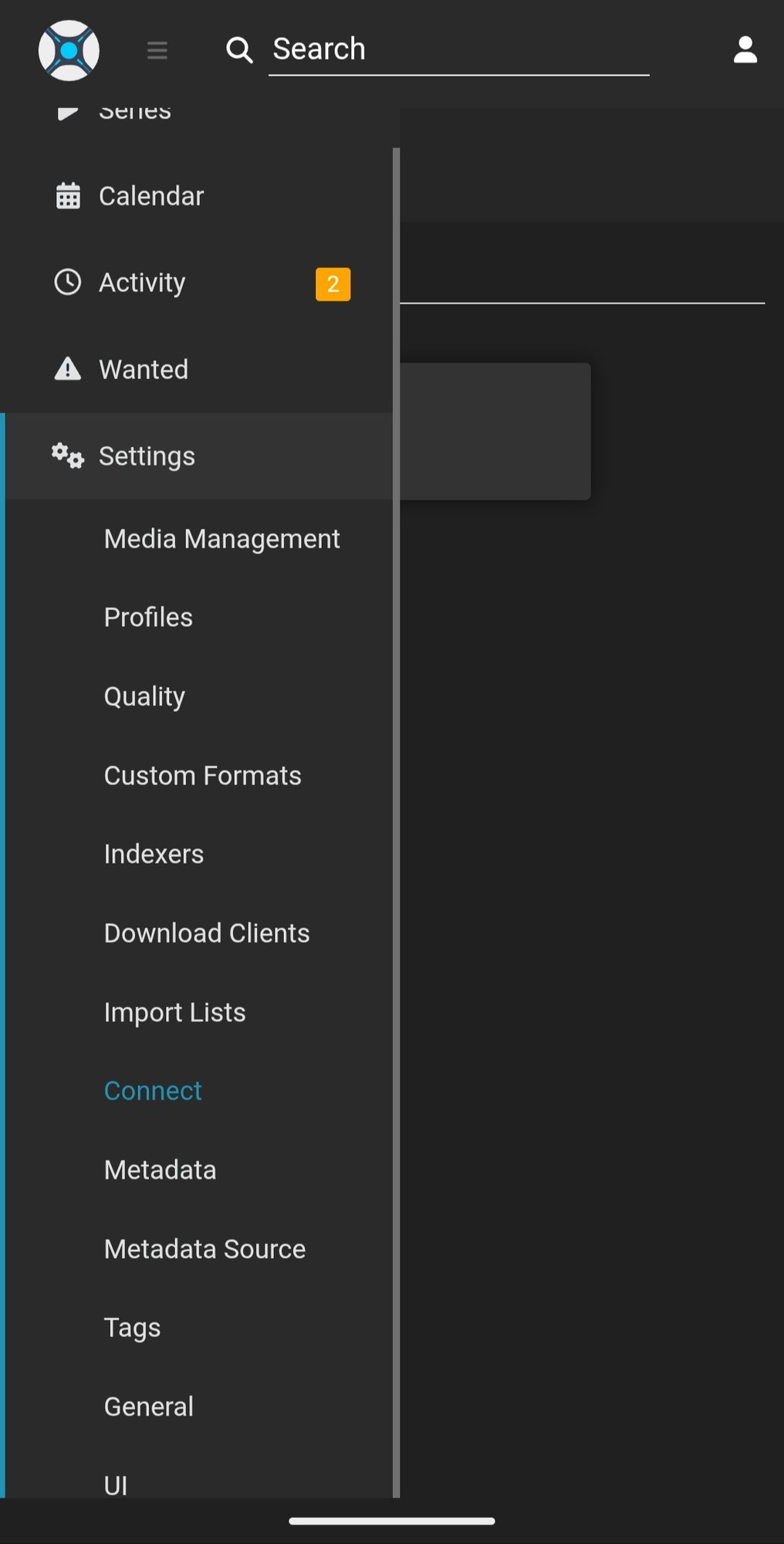
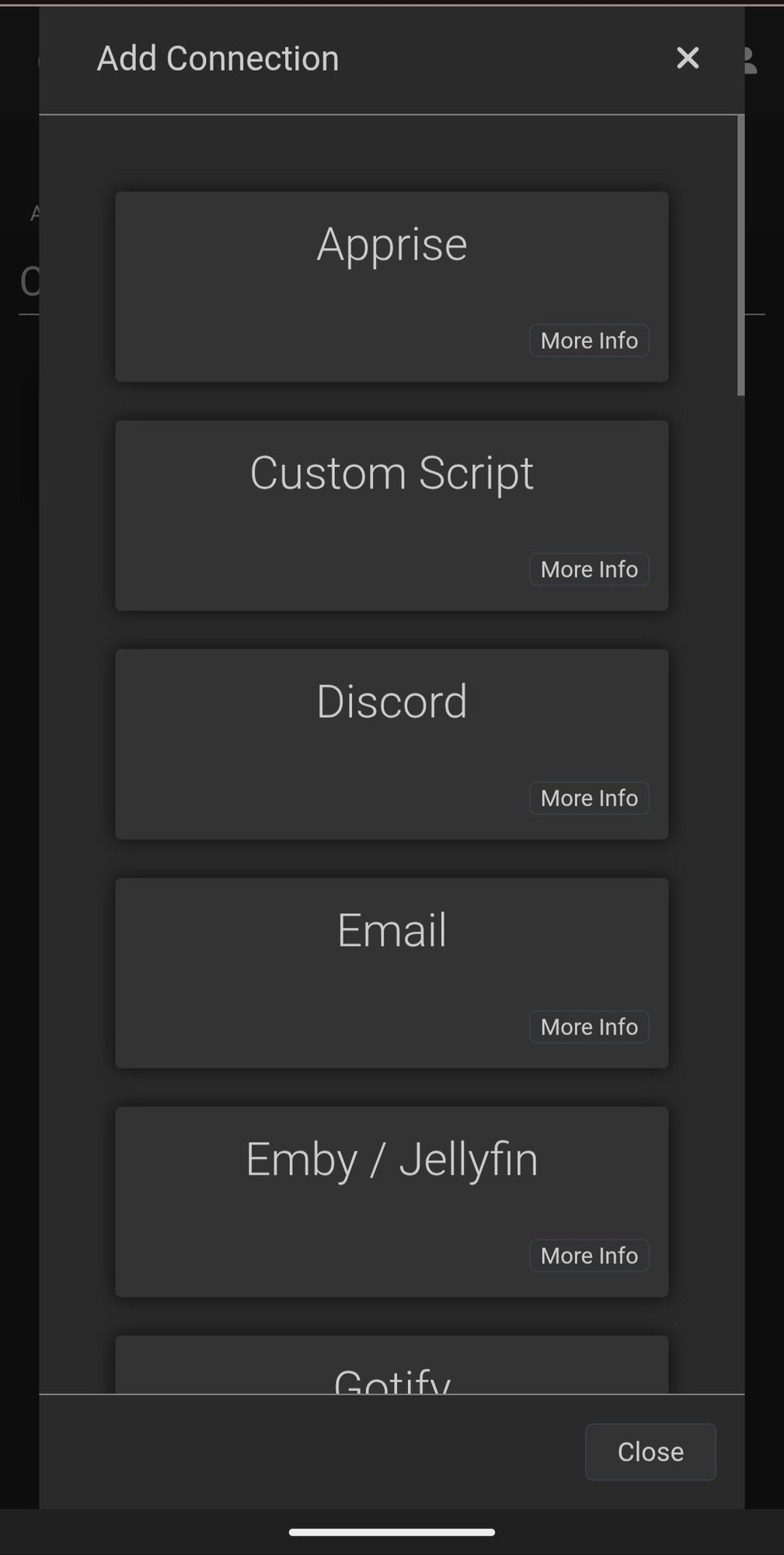
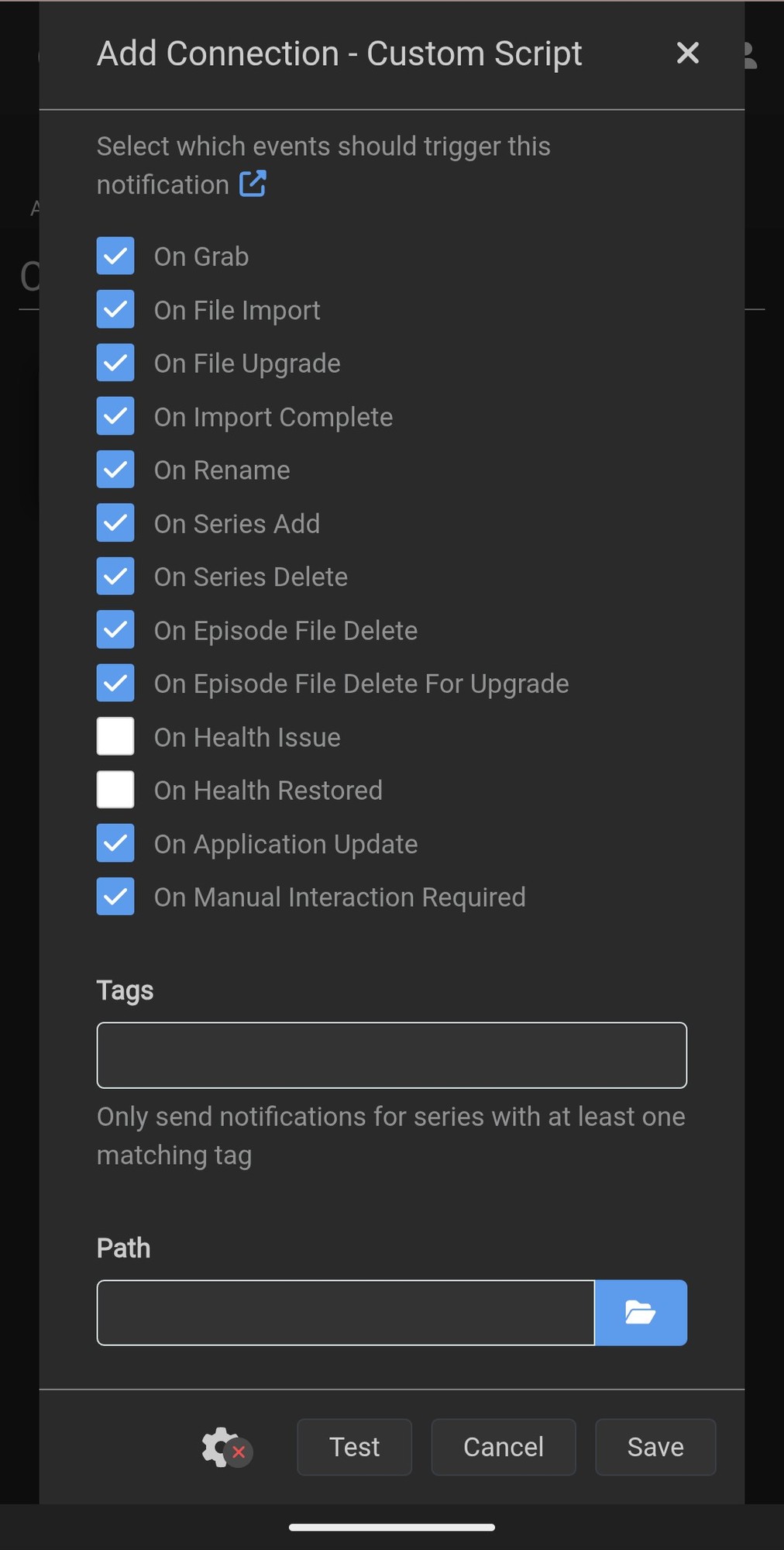
Thank you! And yes, it can - you can put the HISTV command for the CLI version in a custom script in Settings -> Connect -> Custom Script:
screenshots
_Edit: I’ve got a full guide up for Sonarr/Radarr integration, which can be simple or as complicated as you want to make it, here: https://github.com/obelisk-complex/histv-universal/blob/main/Sonarr-Radarr-Integration.md_
That’s amazing, thank you for the explanation and link!
I don’t have a use for this but I like the name :)
Help out a newbie. I currently use handbrake, is this meant as an alternative?
Whether it’s an alternative depends on what you use Handbrake for. HISTV can’t convert ISO or rip discs, it only converts video files. If you just use Handbrake to get smaller videos, HISTV will work for you without having to use more controls than it would take to launch the space shuttle 😅
I just use handbrake to make vids smaller for jellyfin. I will give HISTV a try!

Sweet as, lmk if you have any questions or run into any issues! 😊
Has anyone tried this? OP, have you? Is it fast? I have a tv show that I’ve ripped from blue-ray. It is 600GB and I wanted to save some space, but whenever I try to convert, it’s awfully slow. I have a pretty beefy setup, Ryzen 7 5800xt CPU and a 9070xt GPU.
Haha yes, I use it regularly! And yes, it’ll be plenty fast on your system. I have very deliberately gone over the code base looking for inefficiencies six times now, so it runs nice and lean - I do an efficiency/hygiene pass every couple of releases to make sure bloat doesn’t creep in.
As ark3@lemmy.dbzer0.com said, CPU encoding is slow but it preserves the most quality. No kidding, it really is night and day compared to GPU encoding - for this, just tick “Precision mode” in HISTV. It’s about 1x speed on most videos, so a 45 minute file will take about 45 minutes.
GPU does go a lot faster, my 7900 XTX rips through 1080p at about 28x speed so a 45 minute file takes about 2 minutes. This is good enough for most content; just untick “precision mode” and set the multiplier to 2x or 3x with a bitrate of 4 if you want better GPU quality in HISTV. The multiplier says how high the peak bitrate can go, so you keep more data for fast-moving scenes, without forcing the encoder to keep useless data for slow scenes.
Thank you so much. It’s literally the TV show Friends. I bought the Blu-rays for the whole 10 seasons years ago and I remember using MakeMKV app. It’s high quality because I ripped them to the highest the app allowed I remember but they take so much space that moving them around from that slow hdd I have them on takes literal hours. So, knowing what kind of show it is, what settings do you suggest?
Ah, then the real slowness is going to come from having them on a spinning disk HDD. For friends, 3Mbps or 4Mbps target bitrate should be plenty, with the 2x multiplier should be enough to preserve detail. No need to touch anything else, you don’t need precision mode for it. Maybe start with 3 and that on just one episode, and see how you go - if you find yourself noticing it looks blocky, bump up to 4Mbps and you’ll be golden.
Awesome. Thank you. I’m going to move them onto my nvme one season at a time and make the conversion so we don’t have to deal with the slowness of the HDD
afaik if you want to retain as much quality as possible while saving space you do want to do it on the CPU (so not hw accelerated - slow)
Could you please expand on that? What do you mean?
Really excited to try this. Handbrake always too daunting for me. Currently putting it into a docker container - couple of requests:
- looks like the auto detect fails to see GPU passthrough on docker container. I’m assuming I can force it and ignore the auto detect?
- I pointed it at a 7 season show on my NAS from a work server node. It appears to be copying everything over before starting the encoding. Could this be chunked? I’d like to eventually point this at all my media and let it run
EDIT: Looks like it was my doing on the GPU docker stuff. Need to follow steps to enable GPU on docker then need the following arguments:
--gpus all -e NVIDIA_VISIBLE_DEVICES=all -e NVIDIA_DRIVER_CAPABILITIES=compute,video,utilityAh-ha, thanks for the update on Docker! Saves me going down that rabbit hole 😅
On the files on the NAS: yep, that’s by design. My files are across the WAN, not LAN, so I built it to stage remote files locally before transcoding. It currently pulls a file, transcodes it, and moves it wherever you chose for output. This does mean that going over a network is slow, because you have to wait for the staging and cleanup before doing another file. That’s deliberately conservative though; I wanted to avoid saturating networks in case the network operator takes exception to that sort of thing. A secondary benefit is that the disk space required for operations is just twice the size of the source file - very low chance of having to pause a job because the disk monitoring detected there’s no room.
I’ll look at putting in an override that disregards the network and treats remote files as local for you!
So, I wanted to try the app and it is giving me the EGL rendering whatever issue :/ Could you please make another post once you’ve fixed this issue.
Ah, what version did you try? This is due to issues with the renderer, but I just got this fixed by disabling GPU drawing for the form last night. Give 2.5.9 a go 😊
I was in the comments of the GitHub issue, kalzEOS. I’ll be trying it out when I got time. Appreciate it.
So… How’s it working? 😅 (Just realised it’s been a while since I’ve touched HISTV and this came to mind, I’ve been working on my business and day job)
I haven’t really had the time to convert many. Just one and It is just sitting there at 0% for a long while then it starts converting and the ETA is 22 hours for a 8GB movie. A couple notable things also: 1. the ui is kind of too small for a 4k screen and there is no way to adjust it. 2. this could very well be a user error, but I can’t, for the life of me, find where to set the output file type. I want to convert an mkv to mp4 or something but I can’t find that at all. 3. at the top of the right panel, there is this line that says “Extracting MP4Box…” that never goes away. 4. when I try to convert a movie (mine are all 4k HDR), a window pops up that tells me that DV tools not found, then offers me to download it, but nothing really happen when I click to download it. Could that be why that “Extracting MP4Box…” is sitting there at the top? This is on Cachy OS linux btw.
Ah, I’ll put in a zoom feature, that’s a good idea!
Remind me of the hardware you’re running on? 22 hours for a 4k HDR movie sounds about in the ballpark for converting on CPU. I’ve just switched to Linux (Mint, not Cachy) and I think there’s an issue with detecting GPU on Linux, so this’d track (or you have Precision Mode enabled) - if you see “libx265” or “libx264” in the top right, you’re on CPU. I’m looking into this one.
Can I ask which version you downloaded? I’ll look into the DVTools/MP4box issue.
Also, yes, I removed the codec and container selection boxes - it’s HEVC/MKV by default unless you go for “Compatibility Mode” in which case you get H.264/MP4. “Preserve AV1” of course preserves AV1 which is incompatible with MP4 so they’re mutually exclusive.
Remind me of the hardware you’re running on?
I have a Ryzen 7 5800xt for the CPU, and an RX 9070xt for the GPU
or you have Precision Mode enabled
never checked that box
if you see “libx265” or “libx264” in the top right
Yes, that is what I have now libx265(SW) - HEVC
Can I ask which version you downloaded?
histv-linux-full.AppImage
One additional thing that might or might not be the app’s fault, but I use an app called App Manager to install and integrate my appimages into my system, but it is having an issue with the .png image of the app. Just wanted to let you know about that. Your doesn’t have an icon when it is downloaded, only when it is launched. so it just looks like a file with a generic file icon in my downloads folder.